Native Item Move and Unavailable Items
Company: The Kroger, Co. | Date: 2020
Creating the ability to move items from one fulfillment method (e.g. delivery, pickup, ship) to another on the Kroger Native app (Android/Apple) to match the experience that customers have on Web.
Role: Lead UX/UI Designer
Technology Used: Sketch, Invision
Background
One of my biggest efforts as the designer for Cart and Checkout was to align the native Android / Apple experiences with the Desktop Web experience.
The most impactful disparity was the ability to move items between the customer’s different Carts (e.g. Pickup, Delivery, Ship). Desktop Web had that ability, but Native did not.
Our team realized that customers would be unable to see which items would be unavailable for a particular fulfillment method. With this, we decided to kill two birds with one stone.
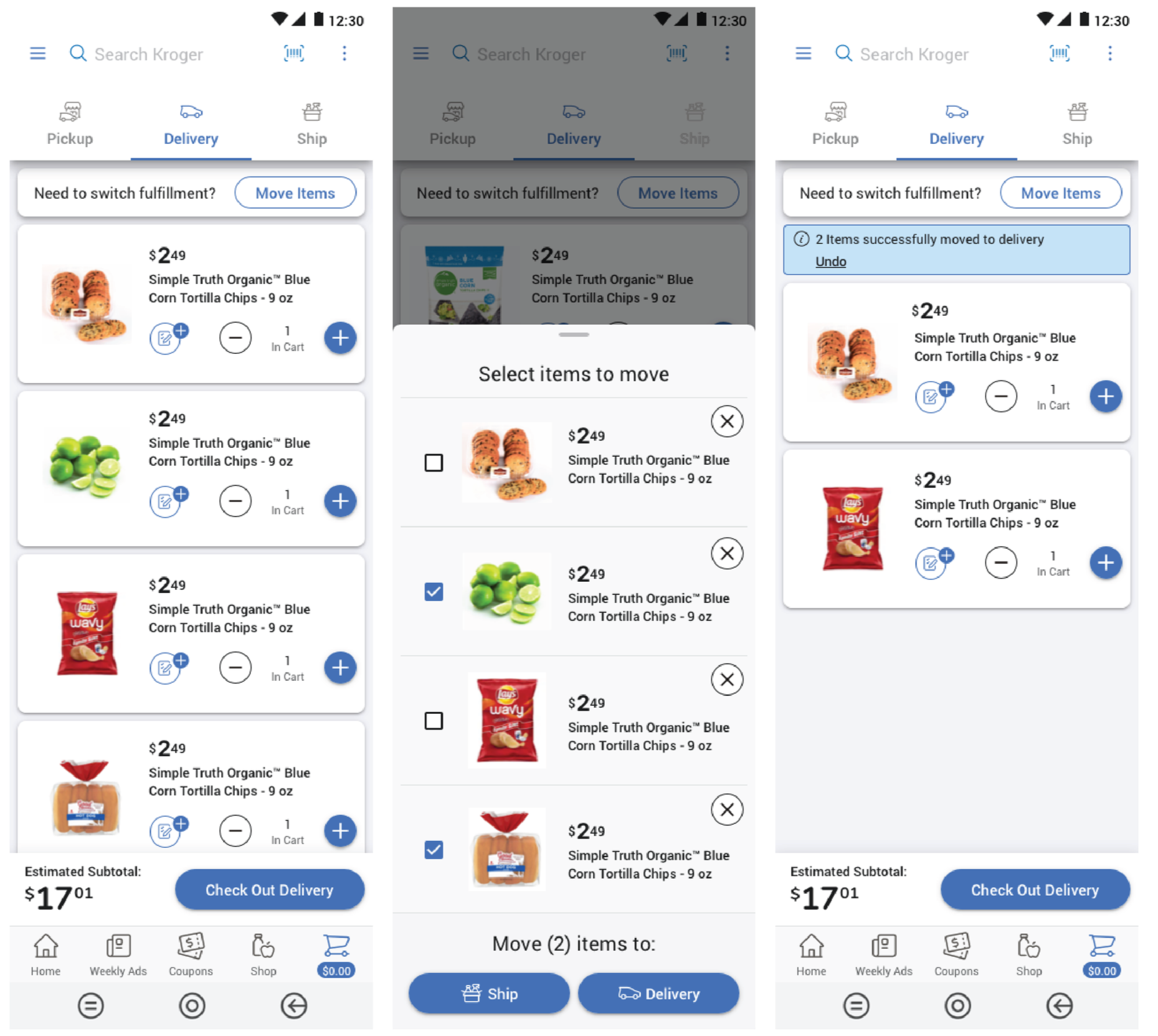
Final Design
We launched the “Need to switch fulfillment?” bar at the top of the cart on the Native app.
This bar sits at the same level of the product cards and does not float above the cards and take up additional space.
Clicking on the “More Items” button opens a bottom sheet/modal (software dependent) which allows the customers to check specific items to bulk move to a different fulfillment method.